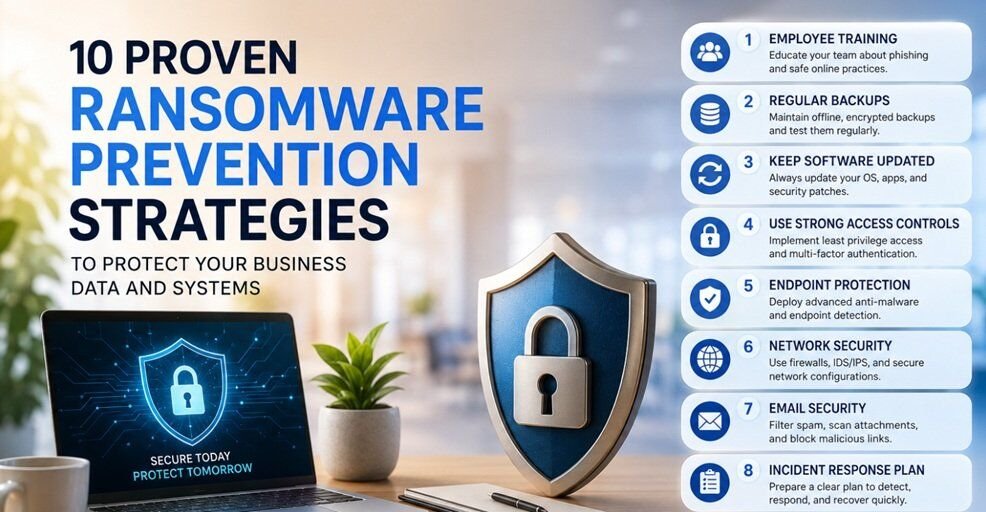
Ransomware doesn’t knock. It doesn’t announce itself. One morning, your team shows up, opens their laptops, and everything is locked, files encrypted, systems frozen, and a ransom note staring back at them, demanding payment in cryptocurrency. I’ve seen it happen to a mid-sized logistics firm that had 14 years of client data wiped out in under four hours. Prevention isn’t a nice-to-have. It’s the only strategy that actually works.
1. Implement Strong Access Controls
Most organizations hand out access like it’s free candy. A new hire joins the marketing team and somehow ends up with read/write access to the finance folder, the HR database, and the backup server. That’s not a hypothetical, but it’s alarmingly common.
Least privilege means exactly what it sounds like: users get access only to what they need to do their job, nothing more. When ransomware hits an account, it can only encrypt what that account can reach. So if your intern’s credentials get compromised, the blast radius is small. When a domain admin’s credentials are stolen, it’s a different story entirely. Audit your permissions quarterly. You’ll be surprised and unsettled by what you find.
2. Enable Multi-Factor Authentication (MFA)
Passwords are broken. I mean, stolen credentials are now the single most common entry point for ransomware attacks. Attackers buy them in bulk off the dark web for next to nothing.
MFA adds a second layer that a stolen password alone can’t bypass. SIM swapping and MFA fatigue attacks exist, but they stop the vast majority of credential-based intrusions dead. Enable it everywhere: email, VPN, cloud tools, admin consoles. If your organization is still treating MFA as optional, that’s a gap that needs closing today, not next quarter.
3. Regularly Update Software
I know. Updates are annoying. They interrupt workflows, sometimes break things, and nobody wants to reboot their machine mid-afternoon. But unpatched software is one of the most reliable ways ransomware groups get in, and they know exactly which vulnerabilities to target.
The WannaCry outbreak in 2017 exploited a Windows vulnerability that Microsoft had actually patched two months earlier. Hundreds of thousands of machines were hit because people hadn’t applied the update. That story repeats itself, in smaller ways, constantly. Build a patching cadence, automate where you can, and treat critical security patches as non-negotiable. The fifteen minutes of downtime are nothing compared to what comes after a breach.
4. Use Immutable Backups
Backups are only useful if ransomware can’t touch them. This is the part most companies get wrong.
Attackers have figured out that if they encrypt your backups alongside your production data, you have no choice but to pay. Immutable backups are designed to prevent the data once written, the data can’t be modified or deleted, even by someone with admin credentials. Think of it like writing in ink versus pencil. Store them offsite or in isolated cloud environments with no direct network path from your primary systems. Air-gapped backups are even better. The goal is simple: ensure that when everything else fails, your backups are untouched and ready.
5. Conduct Security Awareness Training
Here’s the uncomfortable truth: most companies do security training once a year, check the compliance box, and call it done. Employees sit through a 20-minute slideshow, click “I understand,” and go back to opening every email that lands in their inbox.
Real training looks different. It involves simulated phishing emails that look like a message from HR about an updated vacation policy or an urgent notification from “IT Support” asking you to verify your credentials. It runs repeatedly throughout the year, not just in October during Cybersecurity Awareness Month. When a simulated phishing email gets clicked, that’s a teachable moment, not a punishment. The goal is to build a reflex, not just knowledge. Knowledge without habit is useless under pressure.
6. Monitor Network Activity
Ransomware doesn’t usually execute the second it gets in. There’s often a dwell period, which may be days or even weeks, where attackers move laterally, escalate privileges, and stage their attack. During that window, there are signals. Unusual login times. Unexpected data transfers. A workstation is scanning the network at 2 AM. These are breadcrumbs.
The problem is that without active monitoring, nobody’s looking. Security information and event management (SIEM) tools, combined with behavioural analytics, can surface these anomalies before they become catastrophic. You don’t need to see everything, but you need to see the right things. Set up alerts for behaviours that don’t match normal patterns, and actually have someone review them.
7. Segment Your Network
Flat networks are a gift to ransomware. If every device can talk to every other device without restriction, one compromised endpoint can become the launchpad for infecting the entire organization.
Network segmentation means dividing your environment into zones, say your finance systems from your development environment, your IoT devices from your core infrastructure. Even if ransomware gets into one segment, it hits a wall when it tries to spread. Think of it like fire doors in a building: they don’t stop the fire from starting, but they contain it. VLANs, firewall rules, and zero-trust network policies are your tools here. This is one of those things that feels like overkill until the day it saves you.
8. Deploy Endpoint Protection
Traditional antivirus is not enough. It was built to match known malware signatures, which works fine against threats from a decade ago. Modern ransomware is polymorphic, obfuscated, and specifically designed to evade signature-based detection.
Extended Detection and Response (XDR) solutions take security monitoring a step further. Instead of relying only on known malware signatures, they analyze endpoint behaviour in real time, tracking how processes communicate, which files they access, and whether scripts or applications are acting in unusual or potentially harmful ways. If a process starts encrypting hundreds of files in rapid succession, a good XDR system will flag it and can automatically isolate the endpoint before the damage spreads. This is the kind of speed that human response alone can’t match.
9. Test Backup and Recovery
This one sounds obvious. It’s almost never done properly.
Backups that haven’t been tested are theoretical backups. There’s a real difference. I’ve seen organizations go through a ransomware incident, confidently reach for their backups, and discover that the backup jobs had been silently failing for three months. Or that the restore process takes six days, which nobody had verified because nobody had ever actually run a restore.
Test your backups on a schedule. Run full recovery drills. Measure how long it takes to bring critical systems back online. Document the process so that in a crisis, you’re following a playbook, not improvising under pressure. The recovery test is where you find out if your disaster recovery plan is real or just a document that lives in a shared drive.
10. Develop an Incident Response Plan
When ransomware hits, the worst possible time to figure out your response is in the moment. Panic is expensive. Every minute of confusion adds to downtime, data loss, and reputational damage.
An incident response plan answers the questions you don’t want to think about before they become urgent: Who gets called first? Who has the authority to take systems offline? Do you engage law enforcement? Do you notify customers? At what point do you consider paying the ransom, and what’s the decision-making process around that? These conversations need to happen in advance, with the right people at the table, before the pressure is on. Run tabletop exercises. Walk through scenarios. Make the plan a living document that gets updated as your environment changes.
How BDRShield Supports Ransomware Prevention
If there’s one area where organizations consistently underinvest, it’s the infrastructure behind prevention and recovery, and that’s exactly where BDRShield operates.
Their platform is built around a few core capabilities that directly address the gaps outlined above:
Secure, Immutable Backups BDRShield offers immutable storage that keeps backup data unaltered, protecting it against ransomware even if your production environment is fully compromised. It also supports air-gapped backups: copies isolated from the network so ransomware cannot reach them during a network-wide attack. For organizations needing an extra layer of resilience, BDRShield implements the 3-2-1 Backup Strategy, maintaining three copies of data across two media types, with one offsite copy supported by options like tape archival and offsite disaster recovery servers.
Monitoring, Detection, and Verification BDRShield surfaces unusual activity through anomaly detection, giving your team the visibility needed to catch threats before they escalate. Beyond detection, automated backup verification uses checksum checks and validates recoverability by booting VMs and verifying disk mountability, so you know your backups are always ready when it matters.
Fast, Safe Recovery BDRShield enables restoration in isolated environments to ensure safe validation before reintegration, reducing the risk of reinfecting production systems. Backup data is scanned for threats and verified before it’s brought back online. The result: recovery measured in minutes, not days. BDRShield targets an RTO and RPO of under 15 minutes because in a ransomware scenario, recovery speed isn’t just a technical metric; it’s a business continuity issue.
A Hardened, Unified Platform BDRShield’s Hardened Linux Repository prevents unauthorized alterations and uses single-use credentials to add an extra layer of security, protecting backups from both ransomware and insider threats. Having backup, monitoring, and recovery under one coherent platform removes the gaps that tend to appear when you’re stitching together tools from different vendors.
A Final Thought
Ransomware groups are not sophisticated hackers in dark hoodies, but they’re organized criminal enterprises with support teams, customer service portals, and profit margins. They target organizations that have left doors open: unpatched systems, weak credentials, untested backups, and employees who don’t recognize a phishing email.
None of the steps in this list is glamorous. They require consistency, organizational discipline, and the willingness to invest in prevention before there’s a crisis demanding it. But that’s exactly the point. The businesses that avoid catastrophic ransomware incidents aren’t the ones with the biggest security budgets; they’re the ones that treated security as an operational habit rather than a one-time project. Start with what you can do today. Then build from there.
You may also like to read,
- Ransomware: Everything You Need to Know to Protect Your Data
- Ransomware-as-a-Service: Basic Concepts and Protection Techniques
- 9 Essential Network Security Best Practices for Remote Work Businesses