Not long ago, “AI assistant” meant a chatbot that answered simple questions and mostly got things wrong. Today, that picture has completely flipped. AI copilots are now embedded directly into cloud infrastructure, making real decisions, automating complex pipelines, and genuinely taking work off people’s plates.
But here’s what most businesses miss: the copilot itself is only half the story. The cloud platform it runs on determines how fast it learns, how reliably it scales, and how securely it handles your data. AWS, Azure, and Google Cloud each bring something different to the table, and choosing the right integration path can make or break your AI rollout.
Whether you’re just starting to explore AI Copilot Development Services or you’re already deploying assistants across teams, understanding how these three platforms work and how they differ is essential before you commit.
What AI Copilot Integration Actually Means?
AI Integration isn’t just plugging an AI tool into your existing stack. It’s a two-way relationship between your copilot and the cloud environment it lives in. A well-integrated copilot can:
- Pull live data from your databases, APIs, and internal tools
- Trigger workflows and automate actions, not just suggest them
- Maintain memory and context across sessions
- Adapt its behaviour based on user roles and permissions
- Log interactions for compliance, auditing, and continuous improvement
Without proper cloud integration, even the most advanced copilot ends up isolated, smart in theory, but disconnected from the systems that matter most.
AWS: Built for Scale, Loved by Developers
Amazon Web Services has quietly become one of the most developer-friendly environments for AI copilot deployment. The tooling is mature, the documentation is thorough, and the ecosystem is massive.
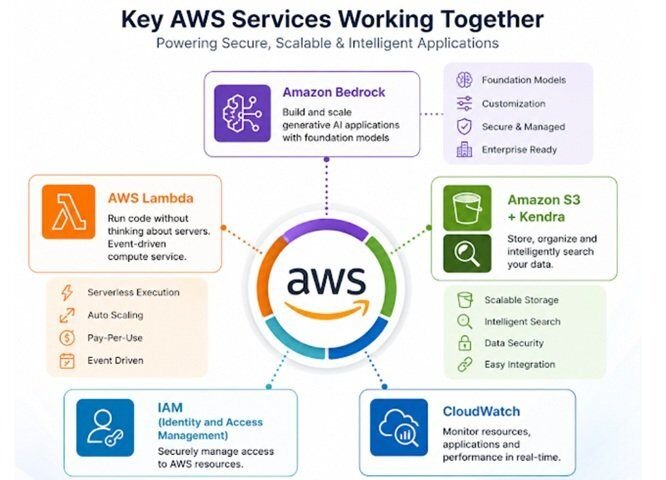
What makes AWS integration work well:
- Amazon Bedrock gives you access to foundation models, including Claude, Llama, and Titan, without managing infrastructure. Your copilot can call these models directly, keeping things clean and serverless.
- AWS Lambda handles event-driven triggers. When a user sends a message, a form is submitted, or a metric crosses a threshold, Lambda fires the right copilot response automatically.
- Amazon S3 + Kendra work together to give your copilot a searchable knowledge base, useful for internal documentation, support articles, and product catalogues.
- IAM (Identity and Access Management) ensures your copilot only accesses what it’s supposed to. Role-based permissions prevent data leakage across teams.
- CloudWatch monitors copilot behaviour in real time, so you can catch errors, latency spikes, or unusual activity before users feel the impact.
AWS suits teams that want flexibility and control. If your engineers are already comfortable with the AWS ecosystem, building Copilot AI integrations here feels natural rather than forced.
Azure: The Enterprise-Grade Choice
Microsoft Azure has a clear advantage in one specific area: enterprise environments already running Microsoft products. If your business lives inside Microsoft 365, Teams, Dynamics, or SharePoint, Azure’s AI integrations don’t feel bolted on, they feel built in.
Where Azure shines for Copilot deployment:
1. Azure OpenAI Service
Bring GPT-4 and other OpenAI models into a managed, enterprise-compliant environment. You get the power of cutting-edge models with the security controls large organizations demand.
2. Microsoft Copilot Studio
Let’s non-technical teams build and customize Copilot workflows through a low-code interface, a genuine time-saver for HR, sales, and operations teams.
3. Azure AI Search
Connects your copilot to structured and unstructured data sources, enabling grounded, fact-based responses rather than hallucinated ones.
4. Entra ID (formerly Azure AD)
Handles authentication and single sign-on, so users get a seamless copilot experience without separate logins.
5. Azure Monitor + Application
Insights gives you a clear view of how your copilot performs across sessions, departments, and time periods.
For companies delivering AI Development Solutions inside regulated industries, healthcare, finance, legal, Azure’s compliance certifications (SOC 2, ISO 27001, HIPAA-ready) are a significant practical advantage.
Google Cloud: Where Intelligence Meets Speed
Google Cloud’s approach to AI copilot integration is rooted in one thing: model quality. Google’s investment in Gemini, PaLM, and Vertex AI means you’re working with some of the most sophisticated language and reasoning models available anywhere.
What sets Google Cloud apart:
- Vertex AI is the central hub for model deployment, fine-tuning, and serving. It gives development teams a unified pipeline from experimentation to production, without stitching together separate services.
- Dialog flow CX handles multi-turn, stateful conversations beautifully. If your copilot needs to manage complex, branching dialogues, customer support, guided workflows, and onboarding, Dialog flow CX handles it without losing context.
- BigQuery integration lets your Copilot run queries against massive datasets in real time. Imagine asking your assistant to pull last quarter’s performance metrics and get an actual answer, not a redirect to the BI team.
- Document AI extracts meaning from contracts, invoices, and reports, letting your copilot work with documents the same way a human would read them.
- Apigee API Management keeps API calls to your copilot secure, rate-limited, and observable at scale.
Google Cloud is a particularly strong fit if your organization is data-heavy and wants a copilot that reasons over large volumes of information quickly.
AI Chatbot: Choosing the Right Platform
Here’s something most vendors won’t tell you: many mature AI deployments don’t pick just one cloud. Multi-cloud architectures are increasingly common, where:
- Core copilot logic runs on one platform
- Specialized services (vision, speech, document processing) are pulled from another
- Data is stored and governed centrally, regardless of which model is responding
This approach gives teams the best tool for each job, but it does require thoughtful architecture upfront. A solid AI Copilot Development Services partner will help you map which services to use where, rather than defaulting to whichever platform they know best.
What to Get Right Before You Launch?
Platform choice matters less than most people think if the fundamentals aren’t in place. Before going live, make sure you’ve addressed:
- Quality: Copilots are only as reliable as the data they’re grounded in. Garbage in, garbage out still applies.
- User trust: Be transparent with your team about what the copilot can and can’t do. Overpromising leads to abandonment.
- Feedback loops: Build a mechanism for users to flag bad responses. This is how your copilot improves over time.
- Governance: Know who owns the copilot, who reviews its outputs, and what happens when it makes a mistake.
The best AI Development Solutions aren’t just technically sound; they’re designed with the people who use them in mind. That human-first thinking is ultimately what separates copilots that transform workflows from ones that get quietly turned off after six weeks.
The Bottom Line
AWS, Azure, and Google Cloud each offer genuinely powerful foundations for AI copilot integration, and each has a context where it performs best. AWS rewards engineering depth and flexibility. Azure wins in Microsoft-heavy enterprise environments. Google Cloud leads in model sophistication and data intelligence.
What they share is this: the potential to give your teams a working partner that’s available 24/7, never loses context, and keeps getting better. The technology is ready. The question is whether your integration strategy is.
You may also like to read,
- Implementing Dynamics 365 CRM with AI and Copilot
- Maximizing Efficiency: Copilot Services for SharePoint Online Administration