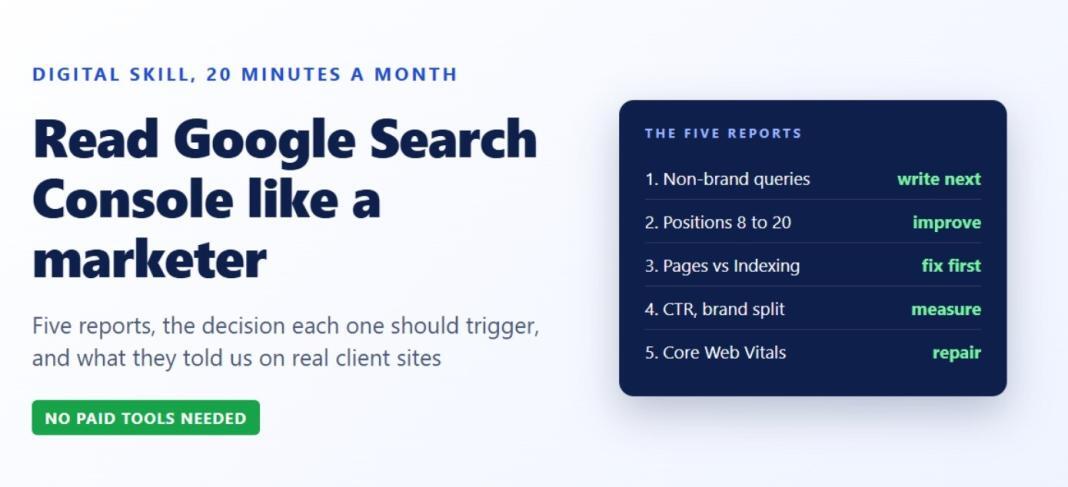
Most people who own a website have opened Google Search Console once, seen a chart, and closed it. That is a wasted skill. The reports inside it are the closest thing you will get to a transcript of what your customers type before they find you, and reading them properly takes about twenty minutes a month. This guide covers the five reports our team uses on client sites, what each one told us in 2026, and the decision it should trigger. No tools to buy, no jargon to learn first.
Why this is a digital skill worth learning
Search Console is free, first-party data from Google about your own site: which queries showed your pages, how often people clicked, which pages Google could not index, and how fast your pages feel to real visitors. Every paid SEO tool estimates these numbers. Search Console reports them. For anyone whose job touches marketing, content or sales, reading it is as basic as reading a bank statement, and far more useful than most of the dashboards people pay for.
Report 1: Performance, filtered to non-brand queries
Open Performance, then Search results. The default view mixes two very different things: people who already know your company and typed its name, and people who typed a problem. Add a query filter that excludes your brand name. What is left is demand you did not already own.
What it told us: a Chennai label manufacturer we rebuilt a site for in 2026 recorded 92.9K impressions and 1.32K clicks in three months, and the non-brand view showed queries such as “label manufacturers in India” and “label stock manufacturers in India” bringing buyers who had never heard of the company. Those became the pages we wrote next.
Decision it triggers: write or improve pages for the non-brand queries with high impressions and low clicks, because Google is already showing you for them.
Report 2: Queries sorted by impressions, with position between 8 and 20
In the same report, sort by impressions and look at queries sitting just below the first page or at the bottom of it. These are pages Google considers relevant but not yet convincing. A small improvement to one of them often does more than a new article.
What it told us: a US used auto parts site averaged position 9.4 across 178K impressions in the three months to 29 October 2026. The queries hovering at positions 8 to 15 were specific part names, so we rebuilt those part pages with original copy, a comparison table and a FAQ section rather than publishing anything new.
Decision it triggers: update the existing page for each of these queries. Add the missing answer, the table, the specification, the photo.
Report 3: Pages, compared with the Indexing report
The Pages report under Performance tells you which URLs earn clicks. The Indexing report under Indexing tells you which URLs Google has not indexed and why. Read them together. A great page that is not indexed earns nothing, and a site with more unindexed pages than indexed ones has a structural problem, not a content problem.
What it told us: a UK job platform had 12 pages indexed against 15 that were not, and its blog articles only appeared after JavaScript ran, so Google saw blank pages. No amount of new writing would have helped until that was fixed. The fix was technical and the developer could ship it from a one-page audit.
Decision it triggers: fix the reasons listed in the Indexing report before you commission content. “Crawled, currently not indexed” usually means thin or duplicate pages. “Discovered, currently not indexed” often means the site is slow or the pages are not linked.
Report 4: Click-through rate by query, read with suspicion
A high overall click-through rate feels like good news. Check what is driving it. If almost all your clicks come from brand queries, your rate is high because people were looking for you anyway, and your real reach is smaller than the number suggests.
What it told us: the same job platform showed a 51.7 percent click-through rate on 14.8K clicks, which sounded excellent until the query list showed that brand searches dominated. The honest reading was that the site had loyal users and almost no discovery traffic, which is why the content plan that followed targeted every UK job seeker rather than people already searching for the brand.
Decision it triggers: measure brand and non-brand separately, and set your content goals on the non-brand number.
Report 5: Core Web Vitals, the field version
Under Experience, the Core Web Vitals report shows how your pages perform for real visitors over the last 28 days, not in a lab test. Pages flagged as poor or needing improvement are costing you rankings and customers at the same time.
What it told us: the Odoo partner site we rebuilt had a homepage lab score of 26 before the work and 96 after, but the field report took the usual 28 days to reflect it. If you only read the lab score you declare victory a month early.
Decision it triggers: fix the page groups the report flags, in order of traffic, and check back in a month.
How AI search changes the reading, slightly
Search Console does not yet report citations in AI answers. InPeaks has covered how query fan-out gets brands mentioned in AI answers, and the practical link to this guide is that AI assistants cite pages that already rank. Rising impressions on question-style queries, with clicks rising more slowly, is the signature of answers being delivered without a visit. Treat it as a reason to make the page more quotable, not as a reason to stop writing.
A twenty-minute monthly routine
- Performance, last three months compared with the previous three, non-brand filter on. Note the five queries that grew most.
- Queries at position 8 to 20 with the most impressions. Pick one page to improve this month.
- Indexing report. Resolve or consciously ignore each reason listed.
- Brand versus non-brand click-through rate. Record both.
- Core Web Vitals. List the page group flagged worst and send it to whoever maintains the site.
Write the five answers in a single note. After three months you will have a content plan that is based on what people actually searched for, which is the whole point of the skill. If the pattern you see is plenty of traffic and few enquiries, the problem is usually on the page rather than in the search results, and we wrote about that separately in why your website gets traffic but no leads.
Learning this is a transferable skill in the same way that video-based learning builds practical workplace skills: it is cheap, it compounds, and it makes every conversation with an agency or a developer more productive, because you arrive with the data. If you would rather have the monthly reading done for you as part of a managed programme, this is how we structure SEO services.
Frequently asked questions
Do I need Search Console if I already have Google Analytics?
Yes. Analytics shows what visitors did after they arrived. Search Console shows what they searched for before they arrived and which pages Google chose to show. They answer different questions.
How long does the data take to appear?
Search Console reports with a delay of about two days, and the Core Web Vitals report reflects a rolling 28-day window, so a fix today shows fully in about a month.
What is a good click-through rate?
There is no universal number. Compare your brand and non-brand rates separately, and judge each against its own trend rather than an industry average.
Vignesh B is the CEO of VTurnU, a Chennai-based B2B digital marketing and web development company. The examples in this article come from client reports in Google Search Console and PageSpeed Insights in 2026 and are published with the clients’ permission.
You may also like to read,
- Top Metrics to Measure the Success of Your Online Events
- Why Your Logo Matters in the World of Digital Marketing
- Top Free Google Tools to Improve Website Performance and SEO